JumpTask vs Clickworker: Which One Is Better?


JumpTask and Clickworker both offer ways to make money online through flexible tasks. They operate in the growing gig economy and attract people seeking å online jobs.
This comparison helps you decide which platform fits your time, effort, and income goals best.
JumpTask vs. Clickworker at a glance
| Feature | JumpTask | Clickworker |
| Task variety | 9 task categories | 6 task categories |
| Payment simplicity | Fast global payouts, low minimum | Weekly/monthly payouts via PayPal or direct deposit |
| Earning average | $30–$70 per month (JumpTask) | $0.01-$0.10 per task (Reddit) |
| Best for | Beginners, global users, crypto curious | Those seeking structured work and stability |
Key differences
While both platforms help users make money online, the way they handle payouts, tasks, and overall experience feels very different in practice.
1. Payout method
- JumpTask offers fast, global payouts with a low minimum and fewer steps to access earnings.
- Clickworker pays in regular currency through PayPal or direct deposit, but some UHRS earnings require a long clearing wait.
2. Task style
- JumpTask focuses on small tasks like surveys, app tests, and quick offers that require minimal skills and low effort.
- Clickworker offers structured data and writing projects that often require entry tests and strong attention to details.
3. Platform experience
JumpTask keeps the workflow clean, visual, and beginner-friendly, making microtasks feel simple and distraction-free.
Clickworker has stricter verification but provides more stable access to tasks.
Task style and variety
Both platforms offer plenty of tasks, but the style, difficulty, and variety can feel very different once you start working.
JumpTask task style and variety
JumpTask keeps things simple. Most JumpTask microtasks are quick actions you finish in minutes. You might complete surveys, test new apps, try free trials, or watch short videos. The tasks feel light and easy to follow.
You don’t need advanced skills or long training. Most people just need a stable internet connection and basic common sense. There’s no heavy entry test before you start. You sign in and begin.
Task types can change daily, depending on availability. Some days offer more surveys, others lean toward app tests. The earnings per task stay small, so consistency matters. It suits people who want flexible online work without complicated data tasks or long instructions.
Clickworker task style and variety
Clickworker offers more structured tasks compared to lighter platforms. Many tasks focus on data labeling, writing, web research, and surveys. Some tasks come through UHRS and require a qualification test before entry is granted.
The work often demands strong focus and close attention to details. Users must follow strict quality guidelines to stay approved. Compared to apps like Clickworker, the platform feels more serious and project-based.
Tasks can take longer to complete, especially research or writing assignments. A stable internet connection is essential for consistent online workflow. Task variety depends on your profile, location, and test results. For users with solid skills, it can provide a steady flow of paid online tasks.
User experience and interface
The way a platform feels to use every day can matter just as much as how much money you make from it.
JumpTask user experience and interface
JumpTask feels simple from the first click. You sign in and get fast access to available tasks without long setup steps. The layout is clean, so users can see their revenue, active offers, and completed tasks in one place.
Most tasks are short surveys or quick app tests. You don’t need advanced skills to get started. That makes it friendly for people exploring microtask platforms.
Some users mention reward reviews that can pause paid tasks for a while. Still, for flexible online work and quick actions, the experience feels smooth and easy to manage.
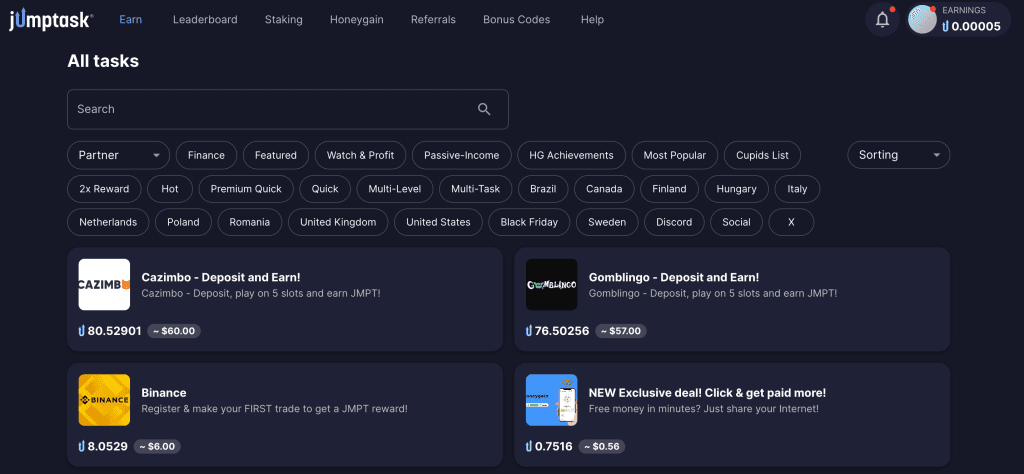
⭐⭐⭐⭐⭐ review:
“Great experience so far! The user interface is very clean, tasks are easy to complete, and I highly recommend it to everyone.”
⭐ review:
“When its time to payout the wallet doesn't attach even after i take the time to create other wallets with other providers and!!! Email them- jumptask, about this.”
Clickworker user experience and interface
Clickworker feels more serious and structured. After you sign in, certain tasks require a qualification test before full access is granted. The dashboard shows open projects, payment information, and performance ratings.
Because many assignments involve data, research, or writing, users need strong attention to maintain quality. Instructions can be long, and you must follow them closely to stay approved.
Compared to lighter platforms, the process feels more formal. For experienced workers, this structure supports consistent paid online jobs. Those just starting out may need time to understand how tasks are listed, tested, and reviewed inside the system.
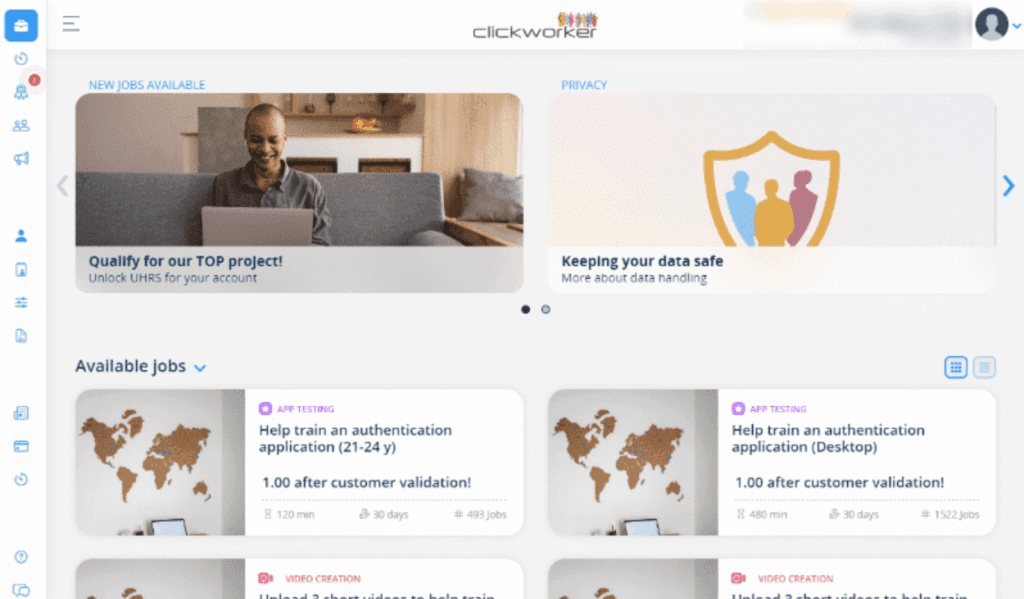
⭐⭐⭐⭐⭐ review:
“I've worked with clickworker since 2019 and highly recommend it to freelancers just starting out and experienced ones. Easy profile setup multiple tasks in many different categories and an awesome amount of options available for multiple types of devices.”
⭐ review:
“They act like they offer work for surveys, but they won't actually let you do any. You get "screened out" as soon as you click on anything. Anything at all. And other then these fake surveys they won't let you take, there are no jobs, no assessments to take. Nothing. And customer service just sends you to a FAQ that was unhelpful to begin with. They don't actually offer jobs, I don't know what this site actually does.”
Earning potential
How much you earn changes based on input, timing, and task choice.
JumpTask earning potential
JumpTask provides consistent and modest payouts. Most users make money by finishing short online tasks that only take a few minutes each.
Casual users earn around $20–50/month by doing quick daily tasks. Active users make about $50–100/month by choosing more complex services and staying consistent. Top earners can hit even more by keeping a strong routine and climbing the leaderboard.
For many, the value comes from consistency. It works best as side cash for daily expenses, not full-time income.
Clickworker earning potential
Clickworker earnings depend on how many tasks you can see. Many workers report making around $6 to $40 per hour. Some experienced users handling detailed data projects reach slightly more.
Most tasks pay $0.01-$0.10 per task. It can help you make money online, but it rarely replaces a full-day job. For many, it works better as steady side hustle income. You can withdraw the money through PayPal or your bank.
Privacy and security
When you’re sharing personal information and working for money online, privacy and security naturally become a big concern.
JumpTask privacy and security
JumpTask keeps the setup simple and easy to manage. Most beginners can create an account quickly and get access to small tasks without a long verification process. You can explore offers and complete basic small gigs without sharing too much personal information upfront.
That lighter start feels safer for people testing a new side hustle to make money online. The platform avoids heavy forms unless a specific project requires extra information. Some tasks involve data or promotional ads, so always read instructions before you submit anything.
If something asks for more than feels reasonable, skip it. There are usually other paid tasks available. For many users comparing Clickworker vs JumpTask, that lower input and flexible workflow is a major comfort point.
Clickworker privacy and security
Clickworker takes a more formal approach to privacy and verification. Before you can earn, you may need to share personal information as part of the approval process.
Some tasks connected to companies and clients require identity checks before you get paid. Compared to lighter gig platforms, the setup feels stricter. That can build trust, but it also means sharing more information upfront.
Many users see this as the trade-off for working with established companies on larger digital products. If you’re comparing best task websites, this structure may feel more secure. Still, always read the advice provided and use PayPal for safer money transfers.
Use cases
Both platforms work well, but the better choice depends on your goals, time, and how you prefer to get paid.
When to choose JumpTask
- You want fast paid rewards without long approval delays.
- You prefer short gig offers over complex assignments.
- You like earning small dollars from simple actions.
- You don’t want to fill out long forms before starting.
- You want to make money in quick sessions.
- You enjoy trying new apps and leaving light feedback.
When to choose Clickworker
- You’re ready for structured gigs with clear rates.
- You want stable paid payouts through familiar systems.
- You’re comfortable earning fixed dollars per task.
- You don’t mind identity checks before getting paid.
- You want serious work that may lead to repeat tasks.
- You plan to post consistent work and make money steadily.
Main points
- JumpTask is about fast, simple tasks, while Clickworker leans toward structured tasks and longer gig work.
- JumpTask offers quicker paid rewards, but payouts depend on crypto value.
- Clickworker provides more stable currency payments, though some tasks require longer approval before getting paid.
- Both platforms can support a small gig income, but neither replaces a full-time job.
- If your main idea is quick tasks with less setup, JumpTask feels easier.
- If you prefer in-depth tasks and predictable paid systems, Clickworker may suit you better.
FAQs
It depends on your goal. JumpTask offers faster paid rewards for short gig tasks, while Clickworker provides more structured work. If you prefer quick payouts, choose JumpTask. If you want steady paid work, Clickworker may suit you better.
There isn’t one single answer. Some users prefer platforms with fixed rates and direct paid systems. The better option depends on how you like to work, how often you want to get paid, and what type of gig tasks you enjoy most.
Clickworker can involve long approval waits before getting paid, especially for certain tasks. Some users also report sudden account reviews. It may require more time and input compared to other websites, and getting consistently paid is not always guaranteed.
Yes, but expectations matter. Many websites let you visit, complete simple tasks, and get paid in small amounts. You can dedicate a lot of your time, yet it’s rarely big money without building experience.

Gabriele Zundaite
Digital Marketing Manager
Meet Gabriele, a marketing specialist focused on digital growth and social media. As a Digital Marketing Manager at JumpTask, she helps others discover new ways to earn online by turning creative ideas into real results. With a degree in Marketing Management and a background in growth marketing and community building, Gabriele shares clear, practical advice for anyone ready to start earning or grow their online presence.
Share:


Related Articles