
How to earn money with JumpTask: A step-by-step guide


JumpTask pays you for completing small online tasks. You watch a video, train AI, answer a survey, or complete a microtask, and credits land in your balance. When you have enough, you cash out.
This guide walks through the whole money earning path. How to set up your account, how tasks turn into credits, what those credits are worth, and exactly what happens when you cash out.
We also cover fees, minimums, and the honest answer to how much you can expect to earn.
If you want a wider overview of the platform first, read what JumpTask is and come back here for the detail.
Key takeaways
- Create a free account. Sign up with an email address, or with Google, Facebook, or Apple.
- Open the Earn tab and pick a task. Every task shows what it pays before you start, so you know what your time is worth.
- Complete the task exactly as described. Follow every step. This is where most rewards are lost.
- Wait for the check. Most checks are automatic and instant. A few are reviewed by a person and take longer.
- Collect your credits. They land in your balance at a fixed rate of 1,000 credits for $1.00.
- Cash out when you reach the minimum. Your first payout needs $1.00. Every payout after that needs $0.50.
- Pick your payout. Gift cards, prepaid PayPal, bank transfer, prepaid cards, or crypto, from more than 5,000 options in over 100 countries.
- Earnings vary and are not guaranteed. Results depend on task availability, effort, and time invested.
How to create your account
Before anything else, you need a JumpTask account to start earning. Creating one will take less than a minute.
You can sign up with an email address or with a social login. Google, Facebook, and Apple accounts all work. Pick whichever is easiest for you, because the account works the same way either way.
Look at the top of the sign-up screen before you continue. There is a banner that says Have a bonus code? If you have a code, tap the banner and enter it there. The code is not part of the sign-up form, so it is easy to miss.
Signing up is free. JumpTask never asks you to pay to join, and never asks you to pay before a payout. This is a good rule on any earning platform. If a site asks you for money before it pays you anything, stop and check it carefully.
Once your account is ready, you can use JumpTask in two places:
- In a web browser, on a computer or a phone
- In the JumpTask app, which you download from Google Play
The app is available on Android. There is no iPhone app at the moment, so iPhone users work in a mobile browser instead. You can still sign in with an Apple account, complete tasks, and cash out the same way.
The Android app has more than 10 million downloads and a 4.6 rating on Google Play.
Make your online time count
JumpTask connects you with easy ways to earn through short online tasks, games, and more.
How you earn money on the platform
After you sign in, you land inside the platform. You’ll find five tabs across the top, and each one does a different job:
- Earn – That’s your main task hub. This is where you find tasks and complete them.
- Honeygain – Instructions on how to set up background earning with the Honeygain app and connect it to your account.
- Referrals – Your personal code to share with friends, and the bonuses you earn from it.
- Bonus codes – Enter a code you received to add a bonus to your account.
- Help – Guides and answers if something does not work as expected.

Honeygain works differently from the other task types. Other tasks need your attention for a few minutes. This one runs in the background, and you set it up once through a separate app.
You will spend most of your time in the Earn tab. It shows the tasks available to your account, and each one is numbered and shows what it asks you to do. What appears there depends on your country and on when you open it, so the list is not the same for everyone.
You can filter by task type if you want to see only one kind of work.
The earning mechanics are the same for every task type. A survey and a game pay you through the same four stages:
- You pick a task
- You complete the task
- We check the task
- Credits land in your balance
Here is what happens at each stage.
Stage 1. You pick a task
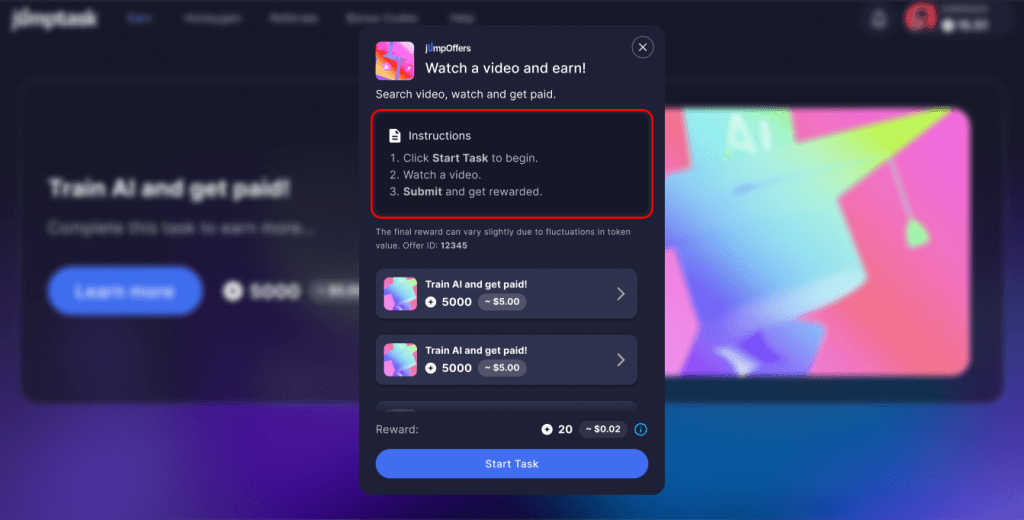
Your dashboard shows the available tasks as cards. Each card gives a short description of what you need to do, and what the task pays.
The reward appears twice. First in credits, then as an approximate dollar value, so you know what a task is worth before you accept it.
Click a task to open it. Inside, you get the full instructions broken into steps. Some tasks take two steps and others take ten, so you can see how much work is involved before you commit your time.
Read the instructions carefully. You need to follow them exactly, because the reward depends on completing the task the way it was described.
When you are ready, click Start task.
Stage 2. You complete it
What happens after you click Start task depends on the task type.
Some tasks take you somewhere else to do the work:
- A game task opens the game, where you play until you reach the goal listed in the instructions.
- A survey opens a form from the company asking the questions.
- A social task takes you to the account or channel you need to follow.
Other tasks run inside JumpTask itself. AI training tasks and microtasks are the clearest examples, because you do the work and submit your answer without leaving the platform.
Either way, the instructions tell you what counts as finished. Follow every step, and follow them in the order they are written. If a task asks you to visit a page and then submit a word from it, both parts have to happen, and skipping one means the task is not complete.
Leaving too early is the most common reason a reward does not arrive. Closing a video before it ends, or leaving a game before you reach the goal, means the task was not finished, even though you did most of the work.
Stage 3. The task is verified
Finishing a task does not always mean the credits appear straight away. Most tasks are checked first, which is why your balance may not move the moment you close a task.
The check confirms you completed the task the way the instructions described. Who does the checking depends on the task type and where you completed it.
Most checks are automatic and finish instantly, so the credits appear right after you close the task.
Some tasks are reviewed by a person instead, usually to confirm the work follows the platform rules. Those take a little longer, and in rare cases up to 72 hours.
There are two common reasons a task does not pass the check:
- The instructions were not followed. A step was skipped, or the task was closed before it finished. This is the most frequent reason by far, and it is the easiest one to avoid.
- A platform rule was broken. Using a VPN is the clearest example. Many tasks are only open in certain countries. A VPN hides your real location, so the system cannot confirm you were eligible for the task.
If a task does not pass, the credits are not added. Read the instructions again before you start the next one, because the same mistake usually repeats.
If you think a task should have paid and it did not, open the Help tab to reach the JumpTask Help Center and contact support. Give them the task ID and the date you completed it, since that is what they need to find your record.
Stage 4. Credits land in your balance
Once the task passes every check, the credits are added to your balance, and your account updates in 3 places at once.
| What you see | What it means |
| Credit total | Your full balance in credits |
| Dollar value | The same balance in dollars, at 1,000 credits for $1.00 |
| Progress bar | How close you are to the payout minimum |

The progress bar is the most useful one day to day. It shows the minimum you need and how far along you are, so you always know roughly how many more tasks stand between you and a payout.
Your credits hold their value while they sit in your balance. The rate of 1,000 credits for $1.00 is fixed and does not change, so credits you earn today are worth the same next month. Nothing about your balance moves on its own.
From here, the money side is straightforward. You keep completing tasks until you reach the minimum, then you cash out.
How payouts work
By now you have put in the work, built up credits, and reached the minimum. So what happens next?
You cash out. This section covers how you turn credits into money you can actually use.
Credit system and thresholds
Before we get to the cash out itself, a few words on how credits work.
Your earnings sit in your account as credits. They are yours, and their value stays fixed until you decide to cash out. The rate is 1,000 credits for $1.00, and it does not change.
That fixed rate is the whole point of the system. Credits you earned last month are worth the same today, and the dollar value beside your balance is the amount you will actually receive.
Before you can cash out, you need to reach a minimum. There are two:
- Your first payout needs $1.00, or 1,000 credits
- Every payout after that needs $0.50, or 500 credits
There is one more thing worth knowing:
Reaching the minimum lets you cash out, but it does not open every option to you.
There are more than 5,000 payout options in total, and each one has its own minimum on top of the JumpTask threshold. Some gift cards start at a few cents. Others start at $50. So a balance of $1.00 gives you a much shorter list to choose from than a balance of $20.
This is worth planning around. If there is a specific gift card or payout method you want, check its minimum first and build up to it, rather than cashing out as soon as you can.
Payout methods
When it comes to payouts, JumpTask works with GIFQ, a payout partner that handles the cash out side.
GIFQ is where your credits become a gift card, a transfer, or crypto. You will see their name when you cash out, so it helps to know what it is before you get there.
Between them, you have more than 5,000 options across over 100 countries and 50 currencies. They fall into four groups:
- Gift cards. The largest group by far. Amazon, Steam, Netflix, Google Play, PlayStation, Uber, and thousands more. Availability depends on your country, so the list you see is not the same as someone else's.
- Money and payments. Prepaid PayPal, Wise, Revolut, Venmo, Skrill, and bank transfer. This is the group to look at if you want money in an account rather than credit with a shop.
- Prepaid cards. Prepaid Visa and Mastercard. These are a type of gift card, but they work like a normal card, so you can spend them in more places. They carry a fee, which the next section covers.
- Crypto. Bitcoin, Ethereum, Tron, and USDC. Several networks are supported for each one, and you provide a receiving address when you cash out.
The right choice depends on what you plan to do with the money. If you want to buy something specific, a gift card for that shop is usually the cheapest route, because gift cards carry no platform fee.
If you want money you can spend anywhere, look at the money and payments group first.
What appears in your list depends on your country and your balance. A larger balance opens more options, as covered above.
How to cash out
Cashing out takes five steps:
1. Complete tasks until your balance reaches the minimum
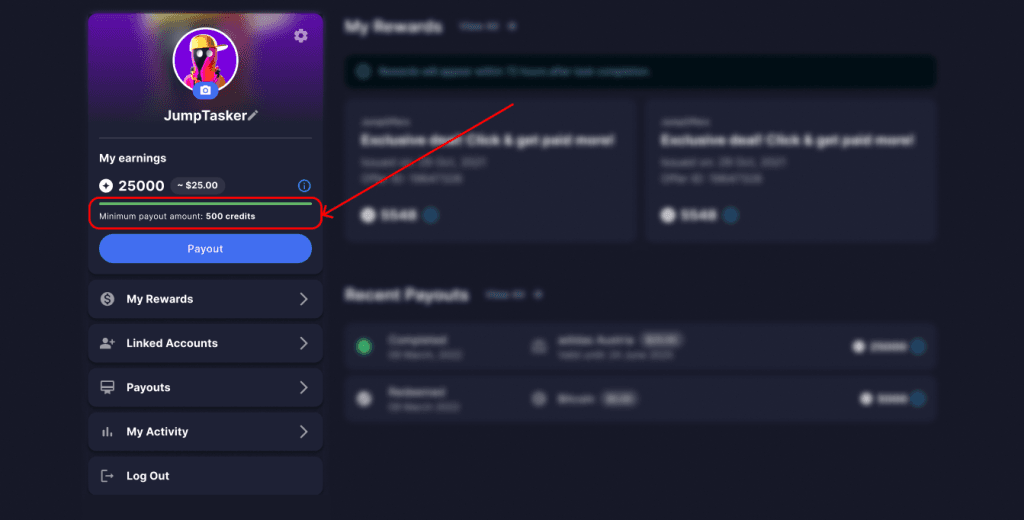
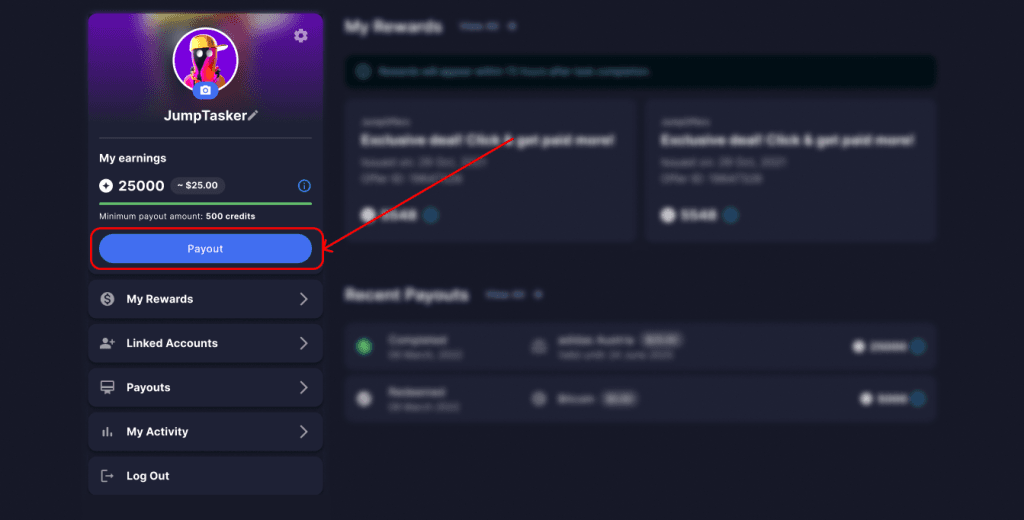
2. Open the Payout section in your account
3. Choose your payout method
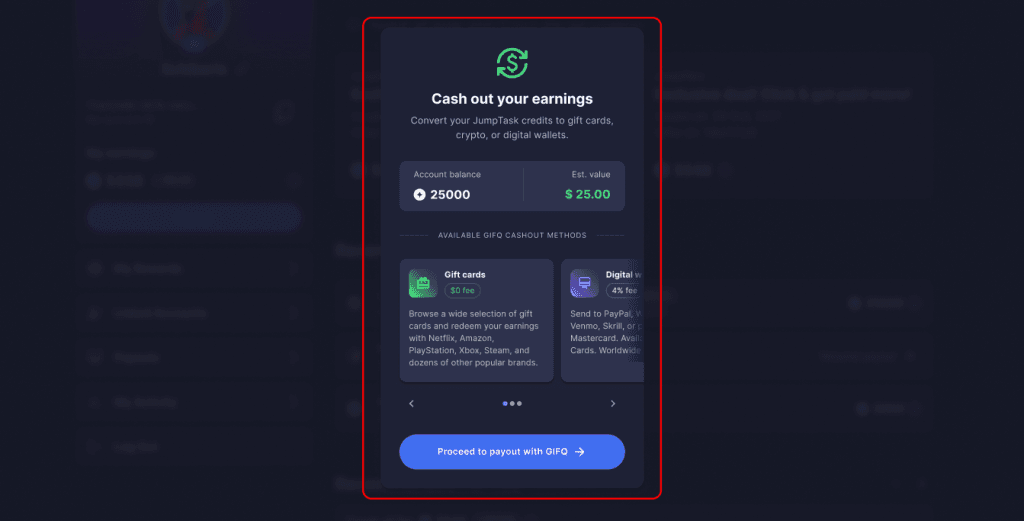
4. Continue to GIFQ to finish the payout
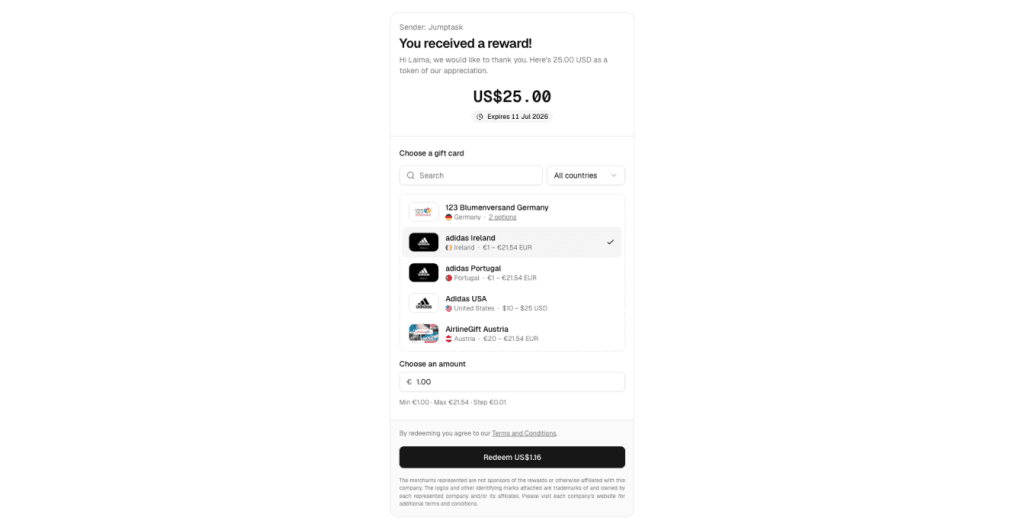
5. Pick your exact option and confirm
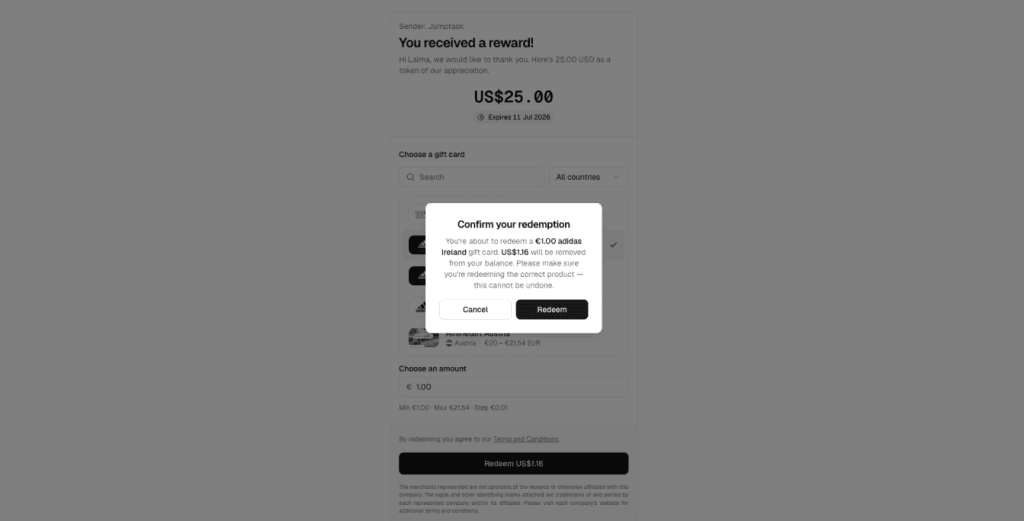
Note that Step 4 takes you to a different website. This is expected, because GIFQ handles payouts for JumpTask. Some people see the change of site and worry that something is wrong. It is not. The redirect is part of how payouts work.
On the GIFQ site, your payout amount is already applied. You search the list, pick what you want, and set the amount. Each option shows its own minimum, maximum, and the currency it is priced in.
Check the option and the country carefully before you confirm. A payout cannot be reversed, so a card for the wrong country cannot be exchanged afterwards.
If the option you pick is priced in a different currency from your balance, the screen shows you both figures before you confirm. You will see the amount of the card and the amount that will be taken from your balance, so you can check it matches what you expect.
After you confirm, the payout appears in your account history. You can check its status there at any time.
Fees
What you pay depends on the method you choose, and not all of the options are free.
| Method | Fee | Paid by |
| Gift cards | No platform fee | Nobody |
| Prepaid cards | 4% of the card value | You |
| Crypto | Depends on the asset and network | You |
Gift cards carry no platform fee. If cost is your main concern, this is the cheapest way to cash out.
Prepaid cards are a type of gift card, but they carry a 4% charge on the value of the card. So a $50 prepaid card costs $52 from your balance. You pay more for the flexibility, because a prepaid card works in more places than a card tied to one shop.
Crypto fees depend on which asset and which network you pick. Some are free and others carry a small charge.
Remember that the option minimums are separate from fees. An option can be free to use and still need a $50 balance before it appears for you.
Make your online time count
JumpTask connects you with easy ways to earn through short online tasks, games, and more.
How much can you earn
You know how the platform works, how to earn on it, and how to cash out. So how much can you actually earn on JumpTask?
This is the question everyone asks, and the honest answer is that it depends.
Three things decide it:
- The task types you pick, because some pay more than others
- How many tasks are available in your country, because availability is not the same everywhere
- How much time you put in
Here is what the main task types pay:
| Task type | Typical pay |
| Watch and earn | $0.50 to $5 per video |
| Train AI | $5 to $20 per hour |
| Microtasks | $0.01 to $25 per task |
| Social earning | $0.50 to $15 per task |
Those ranges are wide, and that is the honest picture. A quick microtask sits at the bottom end. A longer task that needs more attention sits near the top.
Here is a simple example. Say you complete four video tasks at the lower end of the range, at $0.50 each. That gives you $2.00, which is enough for your first payout with $1.00 left over. Doing the same four videos each day for a week puts you at $14.00.
Task availability also moves through the week. A category that looks empty on Monday may be full on Thursday, so one quiet day does not tell you much.
The realistic way to think about it is this. One task will not change much. A steady habit over weeks adds up into something you notice. The people who earn most on JumpTask are not the ones who work hardest in a single day. They are the ones who come back regularly.
JumpTask works as side income. It fits around a job, study, or free time, and it is not meant to replace any of them.
Earnings vary and are not guaranteed. Results depend on task availability, effort, and time invested.
Wrapping up
That is the full path, from your first task to money in your hand.
The mechanics are not complicated once you see them in order. You pick a task and know what it pays. You complete it the way the instructions describe. The task is checked, and your credits arrive. When your balance reaches the minimum, you cash out through GIFQ and pick from thousands of options.
The two things worth remembering are the ones that protect your earnings.
1. Read the instructions before you start, because that is where most lost rewards come from.
2. Check your payout option before you confirm it, because a payout cannot be reversed.
Beyond that, it comes down to habit. One task will not change much, and nobody should tell you otherwise. A steady routine over weeks is what turns small rewards into an amount you actually notice.
Earnings vary and are not guaranteed. Results depend on task availability, effort, and time invested.
FAQs
JumpTask is free to use. Creating an account costs nothing, there is no subscription, and JumpTask never asks you to pay before a payout. You sign up with an email address or with a Google, Facebook, or Apple account, and you can start completing tasks straight away. Gift card payouts also carry no platform fee, so cashing out to a gift card costs you nothing.
How much you earn on JumpTask depends on the task types you pick, how many tasks are available in your country, and how much time you spend. Video tasks pay $0.50 to $5 per video. AI training pays $5 to $20 per hour. Microtasks pay $0.01 to $25 per task, and social tasks pay $0.50 to $15. JumpTask works as side income rather than a replacement for a job.
You withdraw money from JumpTask in four steps. First, complete tasks until your balance reaches the minimum. Second, open the Payout section in your account. Third, choose your payout method. Fourth, continue to GIFQ, the payout partner, to pick your exact option and confirm it. A payout cannot be reversed once confirmed, so check the option and the country before you finish.
The minimum payout on JumpTask is $1.00 for your first cash out, which is 1,000 credits. Every payout after that has a minimum of $0.50, or 500 credits. Each individual payout option also has its own minimum on top of this. Some gift cards start at a few cents, while others start at $50, so a larger balance gives you more options to choose from.
JumpTask pays real money. You earn credits for completing tasks, and 1,000 credits is always worth $1.00 at a fixed rate that does not change. You can cash out to gift cards, prepaid PayPal, bank transfer, prepaid cards, or crypto, with more than 5,000 options across over 100 countries.

Gabriele Zundaite
Digital Marketing Manager
Meet Gabriele, a marketing specialist focused on digital growth and social media. As a Digital Marketing Manager at JumpTask, she helps others discover new ways to earn online by turning creative ideas into real results. With a degree in Marketing Management and a background in growth marketing and community building, Gabriele shares clear, practical advice for anyone ready to start earning or grow their online presence.
Share:


Related Articles