JumpTask’s new payout system and the end of JMPT support


JumpTask just got a serious upgrade. It changes how you cash out, and it works in your favor. We rebuilt the payout system from the ground up. It gives you more ways to get paid, in more countries, with a clear and stable value for what you earn. As part of this change, JMPT is no longer supported inside JumpTask. There's also an important part of this for anyone holding JMPT.
On September 10, 2026, JumpTask withdraws its JMPT liquidity, and selling or trading the token is likely to become very difficult after that. Below we set out the dates and what they mean, so you can decide what you want to do.
Let's walk through it. There's a full FAQ at the end too. Our User Agreement is also updated as of 10 August 2026, including the company operating JumpTask. Read the updated User Agreement.
What is changing
We rebuilt how payouts work on JumpTask. Three things are new, and they all make cashing out easier.
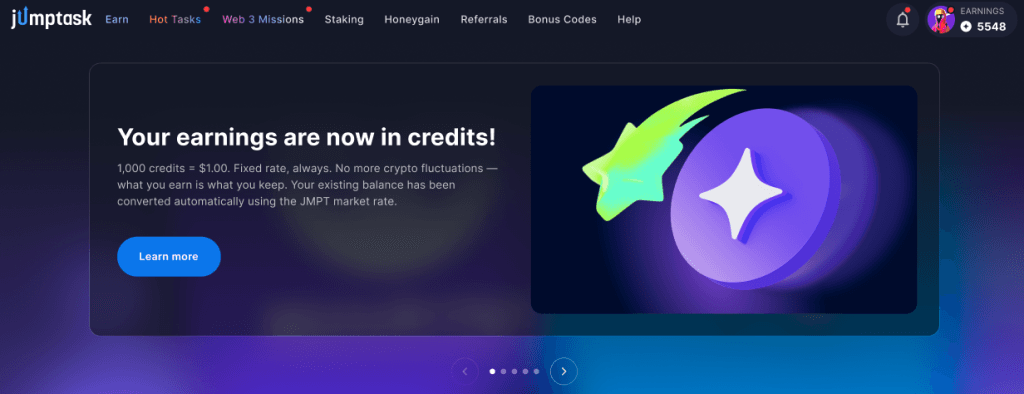
1. Your earnings is showed in credits. 1,000 credits = $1.00. This rate is fixed and will not change. No surprises.
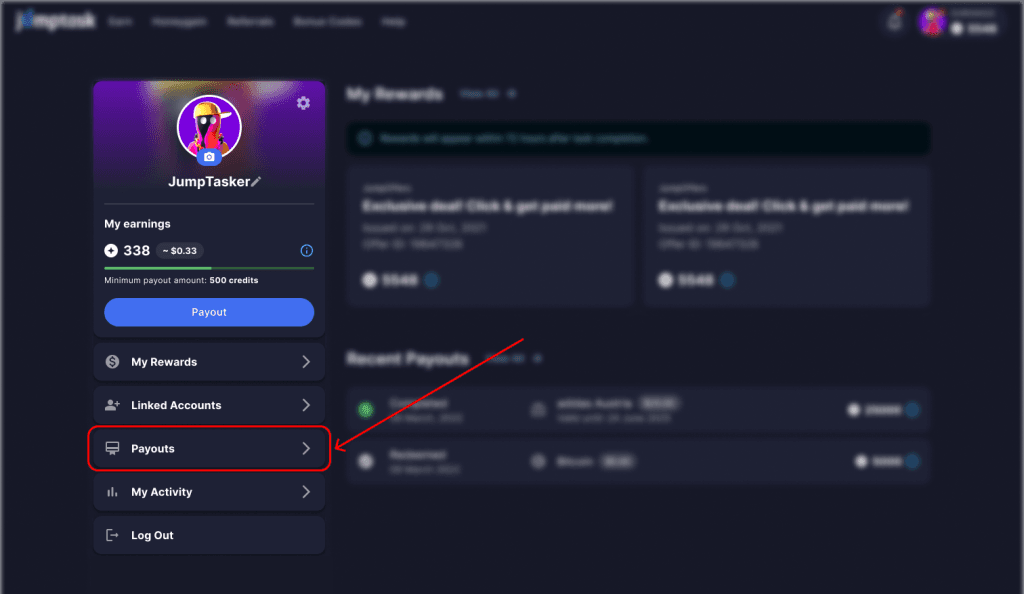
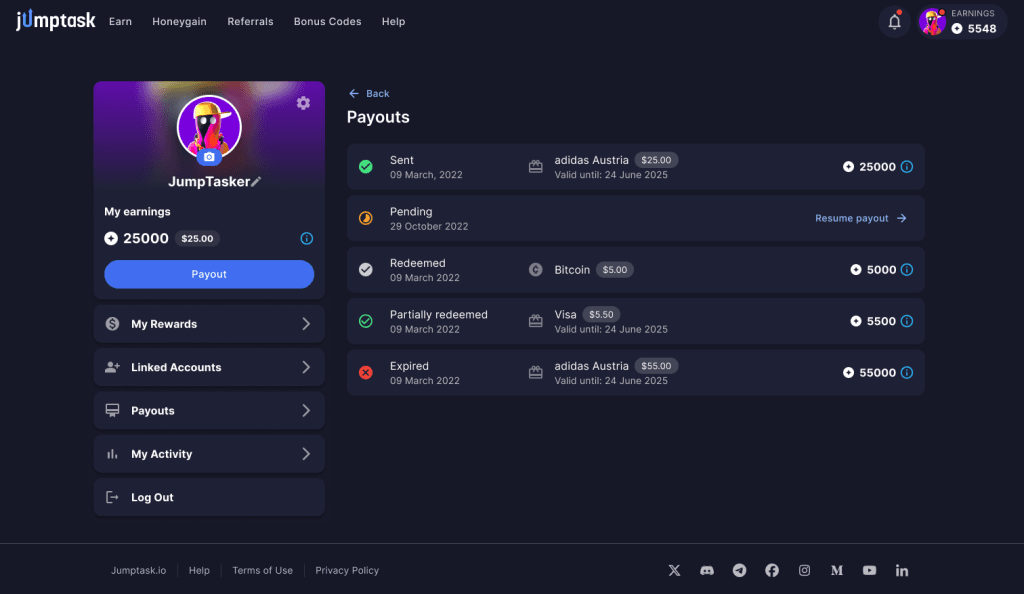
2. A new "Payouts" section replaced the old "My Wallet" section in your profile. This is where you can see your payout history.
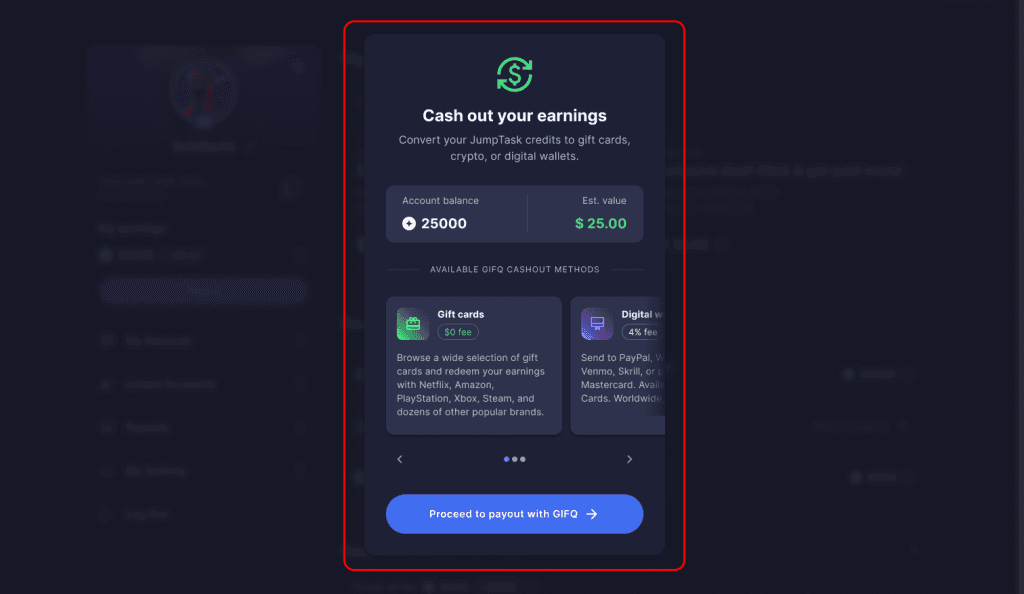
3. We onboarded GIFQ to power the new payout system. It lets you cash out your credits to gift cards, digital wallets (prepaid Paypal, Visa, or Mastercard), and crypto.
JMPT is being phased out inside JumpTask. You get a short period to adjust — 30 days after the new system goes live, we stop supporting it completely. We explain what this means for your balance below.
The new payout system is live as of August 10, 2026.
Your earnings run on credits
Your balance used to be tied to the value of JMPT, so the dollar amount could move up or down. Now your earnings show in credits at a fixed rate. 1,000 credits = $1.00, always.
This matters because the value of your balance stays stable. The market goes up and down. Your balance doesn't. What you earn is what you keep.
There's a small info icon next to your balance. Tap it for a short explanation and a link to learn more.

Earnings vary by activity and location and are not guaranteed.
Meet your new payout partners
Your payouts run through GIFQ. When you cash out, JumpTask sends you to redeem.gifq.com to finish your payout. This is an external website run by GIFQ, our trusted payout partner, which handles your gift card and crypto payouts.
You're only sent to redeem.gifq.com at the moment you choose to cash out. Your earnings stay safe through the whole process.
What happens to your JMPT
This is the question most JMPT holders are asking, so here's the clear answer.
As of August 10th, when the new system went live, JMPT is no longer supported inside JumpTask as a payout method. What happens next depends on where your JMPT is.
If you keep your JMPT inside JumpTask
Your JMPT balance was converted to credits automatically. You didn't need to do anything, and nothing was lost. The conversion used the JMPT market rate on launch day. Log in and your balance is right there in credits, ready to use
If you hold JMPT
Your JMPT is yours. It stays in your wallet, and nothing about this update takes it from you. What changes is this. Since August 10, 2026, JMPT is no longer supported inside JumpTask. On September 10, 2026, JumpTask withdraws the liquidity it provides for JMPT on decentralized exchanges. After that date, selling or trading JMPT is likely to become very difficult, and may become impossible.
The token still exists, but without that liquidity there may be no practical way to exchange it.
We're telling you this ahead of time so you have time to decide what you want to do. We can't advise you on that decision, and we won't make any claims about the token's price or future value.
If you were staking JMPT
Your staking position is still yours, and you can unstake it directly through BscScan — it doesn't depend on JumpTask. Full instructions are on the JumpTask support page. Once unstaked, your JMPT is treated like any other holding, so the dates above apply to you too. Whether you unstake, hold, sell, or do nothing is entirely your decision. We're giving you the dates and the facts, not a recommendation — JumpTask does not provide financial advice, and we're not in a position to tell you what to do with your tokens.
New way to log in
To use the new payout system, you sign in with a social login such as Google, Facebook, or Apple.
Wallet sign-up is no longer available for new accounts.
If you used a wallet to sign in, you'll be asked to add a social login the first time you try to cash out. This is a one-time step and takes less than a minute. It also keeps your account secure for the future.
Where to will your payouts
The old "My Wallet" section is gone. Look for the new "Payout" button in your dashboard instead. That's your home for cashing out and choosing a payout option.
You can track your payout history in the "Payouts" section.
How to cash out, step by step
Here's how to get paid:
Step 1. Log in to your JumpTask account with your social login.
Step 2. Click the Payout button under your earnings:

Step 3. Choose your payout option. Pick a gift card, digital wallet, or crypto:
Step 4. Confirm your payout. JumpTask sends you to redeem.gifq.com to finish:
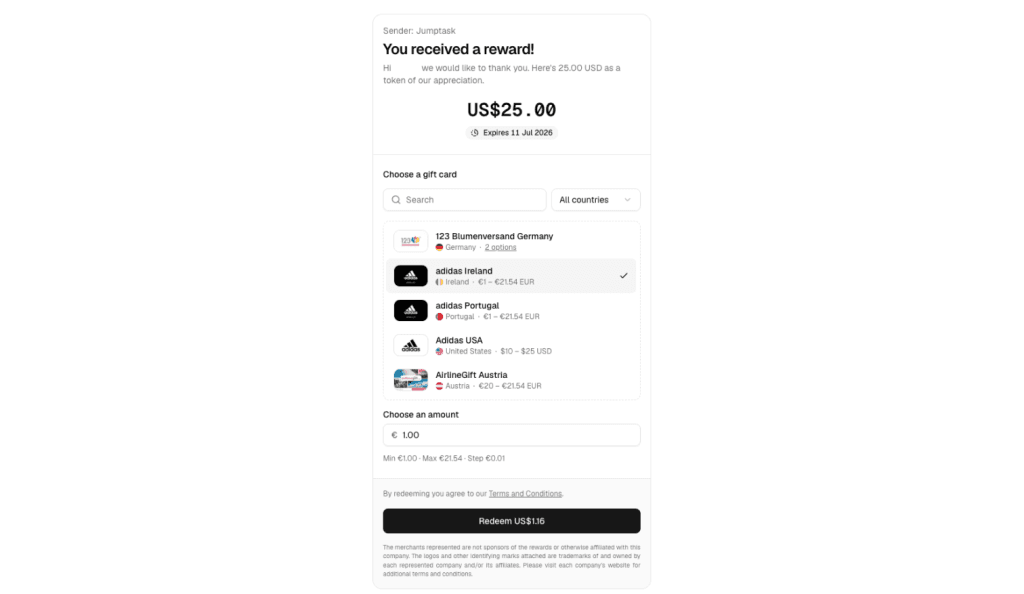
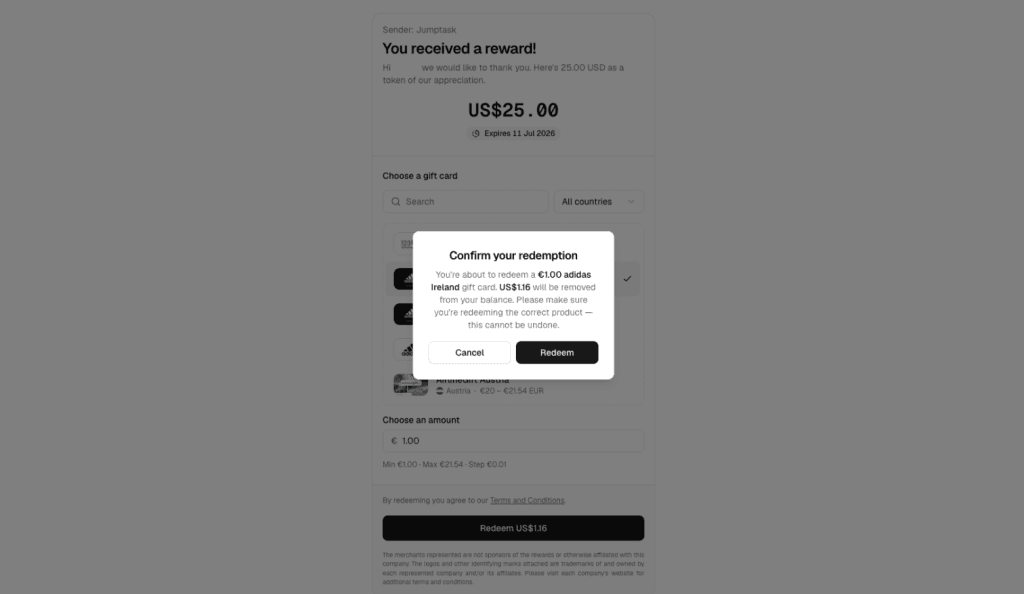
Complete your payout on GIFQ. Your earnings are on the way:
You will be able to cash out once your balance reaches 500 credits, which is $0.50. That is the minimum payout amount for. If you are new to JumpTask, your first payout has a threshold of 1,000 credits ($1.00). After that, the standard 500 credit minimum applies.
Your payout options
Cash out the way you want, with thousands of gift cards, prepaid PayPal, or crypto in over 100 countries. The new system supports 100+ countries, 50 currencies, and 5,000+ gift card options.
Here are some of the most popular categories.
- Money and payments: Prepaid PayPal, Visa, Mastercard, Wise, Revolut, Venmo, Skrill Vouchers and rewarble Bank Transfer Voucher.
- Shopping: Amazon, AliExpress, Temu, eBay, Walmart, and Target.
- Gaming: Steam, PlayStation, Xbox, Nintendo, Roblox, Razer Gold, Discord Nitro, Free Fire, Mobile Legends, PUBG Mobile, and Fortnite/Epic.
- Entertainment and streaming: Netflix, Spotify, Disney, Apple/iTunes, Google Play, and TikTok Coins.
- Fashion and lifestyle: Nike, Adidas, H&M, IKEA, Sephora, and ASOS.
- Food and transport: Uber, Starbucks, and DoorDash.
Cashing out to crypto
If you prefer crypto, that option isn't going anywhere. You can still cash out to crypto. The difference is where it happens: crypto payouts are processed through GIFQ instead of through your JMPT wallet.
The process is the same as any other payout. Open the Payouts section, choose crypto as your payout option, and confirm. JumpTask sends you to redeem.gifq.com, where you enter your wallet address and complete the payout. You can send crypto to any wallet you own.
Bitcoin is among the supported options, and the same minimum applies: you can cash out to crypto once your balance reaches 500 credits ($0.50) or 1,000 credits ($1.00) if you are new user.
One thing to keep in mind: crypto payouts go to the wallet address you enter, so double-check it before you confirm. Crypto transactions can't be reversed.
What you need to remember
Here's a short summary of the main points:
- The new payout system went live on August 10, 2026.
- Your earnings now show in credits. 1,000 credits = $1.00, fixed.
- The value of your balance stays stable.
- Cash out from the new Payout section.
- You get paid through GIFQ at redeem.gifq.com.
- The minimum payout is $0.50, or $1.00 for a new earner's first payout.
- Your JMPT balance was converted to credits automatically.
- JMPT is no longer supported inside JumpTask.
- If you hold JMPT in your own wallet: JumpTask withdraws its JMPT liquidity on September 10, 2026, after which selling or trading JMPT is likely to become very difficult or impossible.
JumpTask now gives you a clearer, more stable way to get paid. Your earnings show in credits at a fixed rate. You have more payout options in more countries. And your JMPT balance moved over to credits on its own. Log in, open the Payouts section, and cash out the way that works for you.
Earnings vary and are not guaranteed. Results depend on task availability, effort, and time invested.
FAQs
When the update went live on August 10, 2026, your JMPT balance on JumpTask was converted to credits automatically, so nothing was lost. The conversion used the JMPT market rate on launch day. Log in and you'll find your balance already waiting in credits.
JMPT is no longer supported inside JumpTask as of August 10, 2026. This change affects how earnings work inside JumpTask. Your converted balance stays safe in credits.
Open the Payouts section, choose a gift card, prepaid PayPal, or crypto, and confirm your payout. JumpTask then sends you to redeem.gifq.com to complete it. You can cash out once your balance reaches the minimum of 500 credits ($0.50).
The minimum payout is 500 credits, which is $0.50. The one exception is your very first payout as a new earner, which has a threshold of 1,000 credits ($1.00). Every payout after that uses the standard 500 credit minimum.
Yes. Crypto payouts are still available, processed through GIFQ. Open the Payouts section, choose crypto, and complete the payout on redeem.gifq.com with your wallet address. The same 500 credit ($0.50) minimum applies.
JumpTask offers payouts to gift cards, prepaid PayPal, and crypto in over 100 countries. Popular options include prepaid PayPal, Amazon, Steam, and Netflix, with more than 5,000 gift cards in total.

Gabriele Zundaite
Digital Marketing Manager
Meet Gabriele, a marketing specialist focused on digital growth and social media. As a Digital Marketing Manager at JumpTask, she helps others discover new ways to earn online by turning creative ideas into real results. With a degree in Marketing Management and a background in growth marketing and community building, Gabriele shares clear, practical advice for anyone ready to start earning or grow their online presence.
Share:


IN THIS ARTICLE
- What is changing
- Your earnings run on credits
- Meet your new payout partners
- What happens to your JMPT
- New way to log in
- Where to will your payouts
- How to cash out, step by step
- Your payout options
- What you need to remember
- FAQs