
POV video tasks: a new way to earn in AI training on JumpTask


JumpTask has a new task type in the AI training section: the household POV video task.
You wear your phone on your head, do a normal chore like washing dishes or folding laundry, and upload the clip.
These clips teach AI models and robots how people do real tasks with their hands. Every approved clip adds credits to your balance. Here is what the tasks are, where to find them, and how to record a clip that passes validation.
Key takeaways
- POV video tasks are a new AI training task on JumpTask. You record an everyday chore from your own point of view and get paid for every approved clip.
- Your phone must sit on your head, not in your hand. The camera tilts down so it sees your hands.
- Three settings matter: zoom at 0.5x or 0.6x, landscape orientation, and normal speed.
- No face can appear in the clip, including your own and including reflections in mirrors or windows.
- Upload the file exactly as your phone saved it. Any edit means the clip is rejected.
- Approved clips add credits at a fixed rate of 1,000 credits = $1.00.
What POV video tasks are
POV stands for point of view. A POV video shows a task the way your eyes see it, with your hands in the frame. Researchers call this egocentric video, and the work of gathering it at scale is called egocentric video data collection.
It is one of the most useful types of AI training data right now, because most videos online are filmed from the outside. They show a person cooking. They do not show what cooking looks like from the cook's own eyes.
That is the gap these tasks fill. When you record yourself washing a plate or folding a shirt, the footage shows the small movements a machine needs to learn:
- How you hold the object
- How you turn it
- What the result looks like when you finish
You do not need any skill or experience. The chore itself is the work. The camera only needs to see your hands.
Your next chore can pay
POV tasks are live in the AI training section. Pick a chore, mount your phone, and record one clip.
What your clips are used for
Your household POV clips become training data for AI systems that need to understand how people do physical tasks.
The main use case is robotics. A robot cannot learn to fold a towel from a written description. It learns from thousands of clips of real hands folding real towels, in real kitchens and bedrooms, with different lighting and different objects.
The same data trains AI models that watch and understand video. An assistant that can tell you which step you skipped while cooking needs to have seen cooking from the cook's point of view.
That is why the clips must be raw, unedited, and filmed at normal speed. The model needs to see the task as it really happens, not a clean version of it.
This is also why household chores are the focus. They are common, safe to record at home, and full of the small hand movements that machines find hardest to learn.
Where to find POV video tasks
Open the Earn page in the JumpTask app or on the web and scroll to the AI training section.
The POV tasks have names like "Record your cooking", "Record your laundry", "Record your dishwashing", and "Record your home cleaning". Each card shows the credits you earn and the clip length before you start, so nothing is hidden.
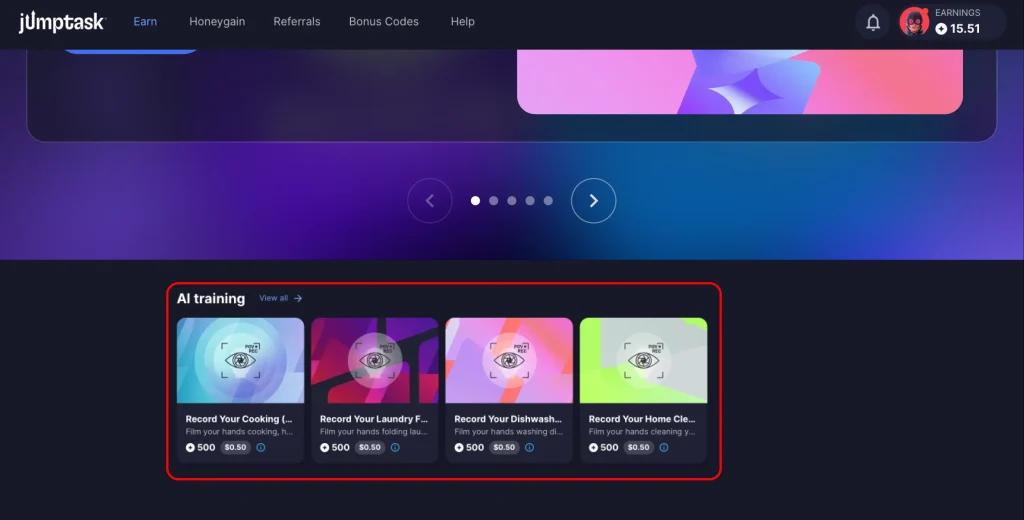
We add new tasks over time, so the list you see today is not the full list.
How a POV video task works
The full process has 6 steps. Most of them take less than a minute.
- Pick a task. Choose a chore from the AI training section and read the task details. The pay rate and clip length are shown before you accept.
- Mount your phone. Strap it to your forehead with a head mount, an elastic headband, or a cap with a clip. Tilt the camera down so it sees your hands. Both hands stay free. Any cheap mount works, and a homemade one is fine.
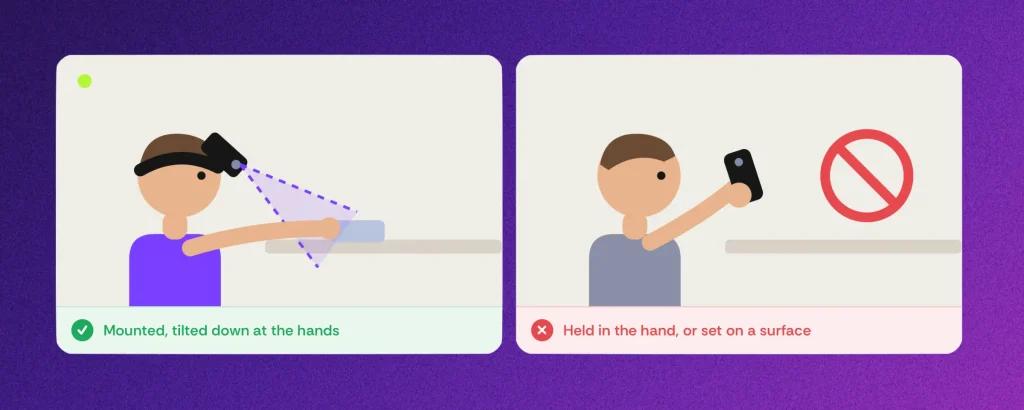
3. Check 3 camera settings. Zoom at 0.5x or 0.6x. Landscape orientation. Normal speed, not slow motion. Most phones already record at 1080p and 30 fps, so you rarely need to change anything else.

4. Record the whole task. Start the chore, finish it, and show the result. One task, one clip, start to finish.
5. Upload the raw file. Send the video exactly as your phone saved it. No trimming, no filters, no text or stickers.
6. Get the result. Every clip goes through an automatic validation check first. It confirms the basics, like orientation, zoom, and that the video was not edited. Clips that pass are approved and add credits to your balance.
What makes a clip pass validation
Only approved clips pay, so it is worth reading the full POV recording guide before your first clip. The rules are not hard, but the validation check covers all of them.
Keep your hands in the shot. The value of the clip is your hands doing the task. If they leave the frame, the clip loses its value and its payout. One hand is fine when the task only needs one. The 0.5x zoom exists for this reason. At 1x zoom, your hands are usually cut off.

Keep people out of the shot. This is the strictest rule. A visible face means the clip is rejected, and that includes your own face. Also keep out photos of people on walls or shelves, ID cards, documents, and screens that show names or numbers. Check mirrors, oven doors, and windows first. They can catch your face without you noticing.

Give the camera enough light. The test is clear. If your hands are visible in the recording, the light is fine. A bright room and a dim room both work. Darkness does not. Avoid flickering lights and fully white washed-out areas.
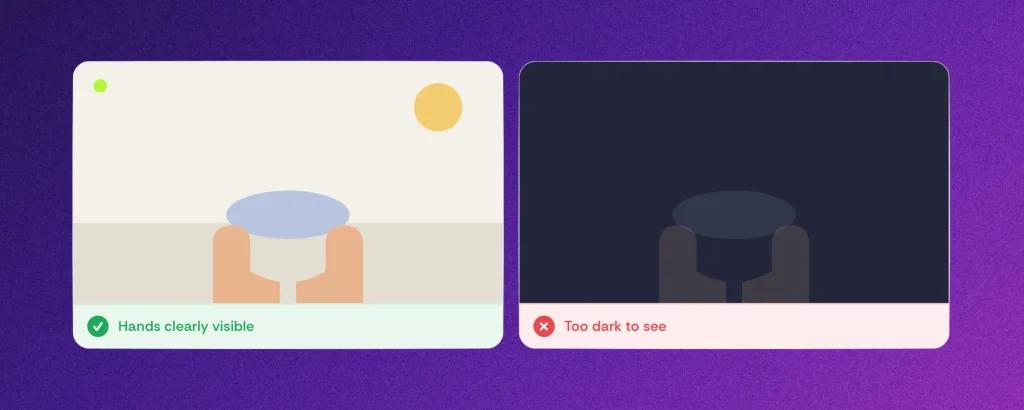
Do not edit. Any change after recording gets the clip rejected. That includes cuts, brightness fixes, and effects. Straight from the camera roll to the upload.
The most common reasons for rejection are:
- Vertical video
- Zoom above 0.6x
- A phone that was held in the hand or placed on a surface
- Long pauses
- Slow motion
- Blurry or shaky footage.
The guide has a 7-point checklist you can tick before you press record.
How automatic validation works
You do not wait days to learn whether a clip passed. When you upload, an automatic check runs on the file. It looks at the technical rules first: landscape orientation, the right zoom level, normal speed, and a raw unedited file.
If the clip fails, you see the reason. That means you can fix the setup and record again without guessing what went wrong. If the clip passes, it is approved and the credits are added.
Automatic validation is good for you for a clear reason. The rules do not change between reviewers, and a clip that meets them is paid.
Read the guide once, record correctly, and every clip after that is quick to approve.
How you get paid for POV video tasks
Every approved clip adds credits to your JumpTask balance. 1,000 credits = $1.00. That rate is fixed and does not change. Your first payout starts at $1. After that, you can cash out from $0.50.
Cash out the way you want, with thousands of gift cards, prepaid cards, or crypto in over 100 countries. POV clips work like any other task on the platform. The credits go into the same balance, and you choose the payout method.
Earnings vary and are not guaranteed. Results depend on task availability, effort, and time invested.
Ready to record your first clip?
Pick a task, record the video, get paid. Most clips pass on the first try when the setup is right.
FAQs about POV video tasks
No, you do not need a special camera for POV video tasks. A normal smartphone is enough. Most phones already record at 1080p and 30 fps. The only setting you usually need to change is the zoom, which should be 0.5x or 0.6x.
Egocentric video data collection is the process of gathering first-person videos to train AI systems. The camera sits at eye level and records what the person sees and does with their hands. On JumpTask, this is what a POV video task is. You record an everyday chore from your own point of view, and the approved clip becomes training data.
No, you cannot hold the phone in your hand for a POV video task. The phone must sit on your head and point down at your hands. Clips that look hand-held or placed on a table are rejected. A cheap head strap, a headband, or a cap with a clip all work.
Another person can be in the room only if they never appear in the shot. No face can appear in the clip, in a mirror, or in a photo on the wall. The safest choice is to record alone and check every reflective surface before you start.
A POV clip is rejected when it fails the validation check. The most common reasons are a visible face, vertical video, zoom above 0.6x, a phone that was not head mounted, long pauses, slow motion, blurry footage, or editing after recording. The POV recording guide lists every rule.
A household POV task is a JumpTask AI training task where you record an everyday chore from your own point of view. You mount your phone on your head, do the chore from start to finish, and upload the raw clip. Current tasks include cooking, laundry, dishwashing, and home cleaning.
You get paid for POV video tasks in credits, the same as every other task on JumpTask. Each approved clip adds credits to your balance at a fixed rate of 1,000 credits = $1.00. Your first payout starts at $1, and after that you can cash out from $0.50 to gift cards, prepaid, or crypto.

Gabriele Zundaite
Digital Marketing Manager
Meet Gabriele, a marketing specialist focused on digital growth and social media. As a Digital Marketing Manager at JumpTask, she helps others discover new ways to earn online by turning creative ideas into real results. With a degree in Marketing Management and a background in growth marketing and community building, Gabriele shares clear, practical advice for anyone ready to start earning or grow their online presence.
Share:


IN THIS ARTICLE
- Key takeaways
- What POV video tasks are
- What your clips are used for
- Where to find POV video tasks
- How a POV video task works
- What makes a clip pass validation
- How you get paid for POV video tasks
- FAQs about POV video tasks